
Inbox
Explain the role of Inbox in Slate, recognize how responses to Slate communications can return to Inbox, locate and understand a student message in context, and use Inbox to support continued communication with students.
Inbox helps bring student responses back into Slate so counselors can continue conversations while keeping communication connected to the student and their record.
Inbox: Continuing the Conversation
Slate isn't only a tool for sending communications. Students respond. They ask questions. They need help.
They may reply to an email, respond to a text message, or continue a conversation that started somewhere else in their journey.
When communications are configured to route responses into Slate, Inbox provides a place for counselors to receive, review, and respond to those messages.
Instead of treating communication as something separate from the student record, Inbox helps keep the conversation connected to the work you're already doing in Slate.
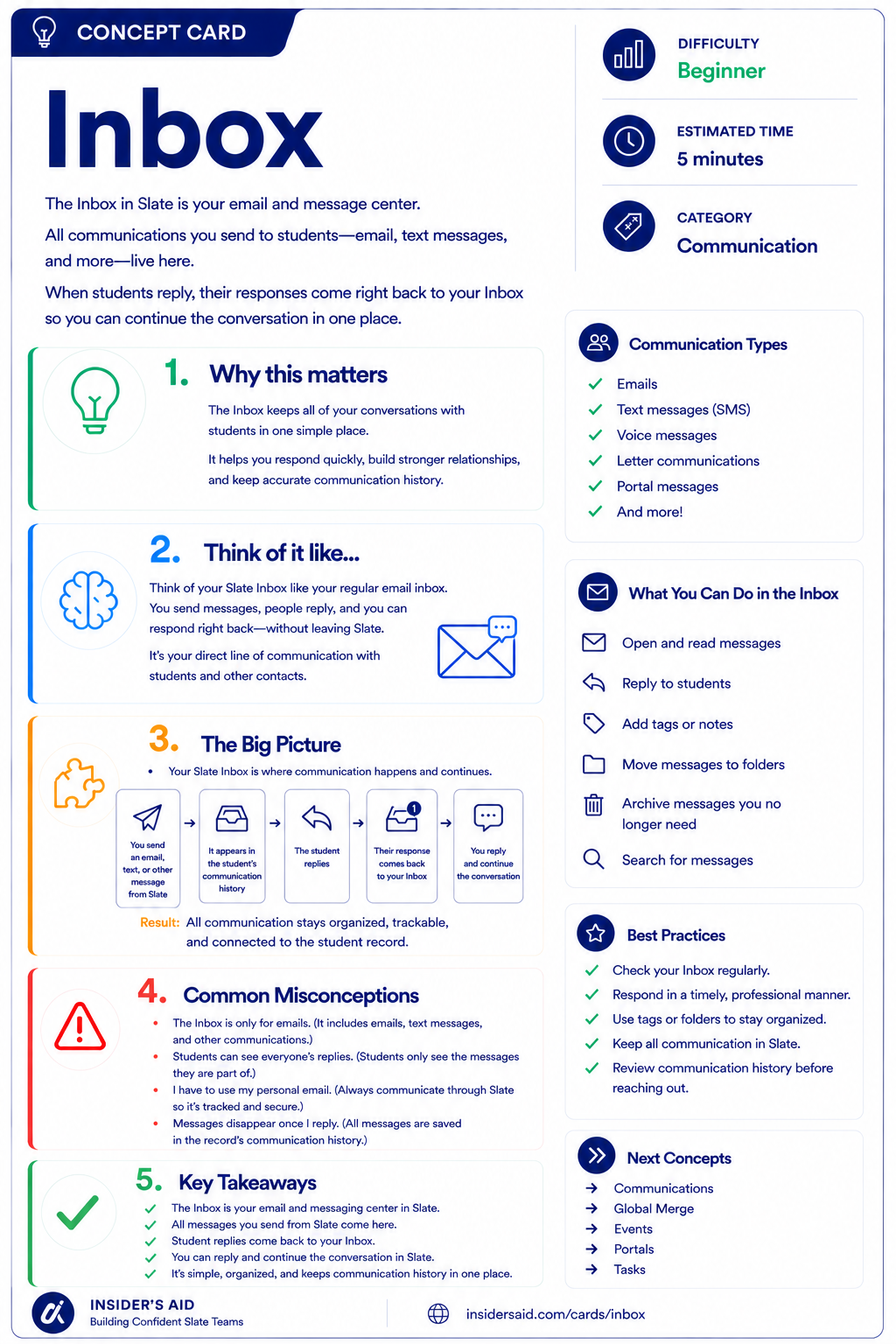
Inbox
Your email and message center in Slate, where every conversation with students stays in one place.
Slate Communication → Student Response → Inbox → Counselor Response
Your institution sends a message through Slate
The student replies with a question or update
Supported responses route back into Slate
You can see the student and what surrounds their question
You respond with information, not guesses
Communication goes out
Student responds
Response returns to Inbox
Counselor reviews in context
Conversation continues
Inbox helps close the communication loop — outbound messages and inbound replies belong to the same conversation.
Slate isn't only sending information outward. When students respond, counselors can continue the conversation within the same ecosystem.
Remember these
A Slate area used to receive and manage responses to supported communications.
A communication received from or sent to a student.
The ongoing exchange of messages associated with a communication.
The information surrounding a student's question that helps you understand how to respond.
Check your understanding
One question at a time. Wrong answers are just practice.
What is one of the primary purposes of Inbox?
Explore a Student Message
Locate a message in Inbox and understand the conversation in context.
Open your institution's Slate database in another tab. Navigate to Inbox and locate a message or conversation you are permitted to view. Do not send or modify anything for this activity — simply explore the information available to you.
- Identify who sent the message
- Identify what the student is asking or communicating
- Look for previous messages or conversation history
- Notice what student or record information is available from the Inbox experience
- Think about what additional context you might need before responding
Before responding, can you explain what the student needs? Use this mental template — and keep student information in Slate, not here.
“The student is contacting us because __________. Before I respond, I may need to know __________.”
Inbox configuration, permissions, communication channels, routing, and available information can vary by institution. Focus on understanding the communication workflow rather than finding an identical screen.
Slate is highly customizable. Your institution's tabs, fields, views, permissions, and processes may differ from examples used throughout Insider's Aid. Focus on understanding the concept rather than finding an identical screen.
Reflection
A student replies: “I already completed that. Why am I still getting this email?” What is the best first response strategy?
A Student Responds
A student receives a Slate communication about an upcoming requirement and replies: “I thought I already completed this. Can you tell me what's still missing?” What should you do first?
What should you do first?
Don't Make the Student Repeat Themselves
A student has exchanged several messages with your institution. They write: “Like I mentioned in my last email, I'm still having trouble completing this.” What should you do?
What should you do?
The Message Is Only Part of the Story
A student messages: “Did you receive it?” The message doesn't explain what “it” is. What should you do?
What should you do?
Think Like a Slate Counselor
Read the message
Understand the conversation
Check the student context
Respond to what they actually need
When a student contacts you, don't think only: “What should I reply?”
Think: “What is this student trying to accomplish, and what context do I need before I respond?” Inbox helps counselors connect communication with the student's broader journey.
Don't make students retell a story Slate can already help you understand. Review the conversation and the record before asking the student for information they may have already provided.
Put It Together
The Counselor pathway now builds: Find → Understand → Collect → Engage → Communicate.
Start with the right student.
Understand the information stored about them.
Recognize how information can be collected.
Understand how the student has interacted with your institution.
Continue the conversation using the context Slate provides.
An integrated example: PERSON RECORD → EVENT: Campus Visit → COMMUNICATION: Follow-up email → STUDENT RESPONSE: “I loved my visit. What's my next step?” → INBOX → COUNSELOR: Reviews the student's information and responds with relevant guidance.
You're no longer treating each student interaction as an isolated task. You're using Slate to understand the student's journey and continue the conversation from where they already are.
Sometimes You Need More Than a Conversation
Some processes require counselors or staff to review information in a structured way.
You may need to look at documents, information, forms, notes, or other parts of a record together before determining what happens next.
That's where Reader comes in.
Keep Learning
Inbox
Your email and message center in Slate, where every conversation with students stays in one place.
Records
Review the starting point for understanding the student.
Events
Review how student engagement can provide context.
Reader
Learn how information can be brought together for structured review.
Forms
Review how students provide information.
Finished the lesson?
Mark it complete to track your progress. Progress is saved in this browser.
Reader
Understand how Reader brings records and information together for structured review.