
Checklists
Explain the purpose of Checklists in Slate, distinguish between a requirement and a received Material, identify complete and outstanding checklist items, and use checklist information to understand what still needs to happen in a student's process.
Checklists help track requirements by showing what is complete, what is still outstanding, and what may need to happen next.
Checklists: What Is Still Needed?
Once you've verified what has been received, the next processing question is: What is still missing?
Slate Checklists help organize and communicate requirements tied to a student, application, or process. A checklist item might represent something the student must submit, complete, or satisfy.
Examples can include an official transcript, test score, recommendation, residency documentation, enrollment deposit, FAFSA, orientation requirement, or other institutional next steps.
Checklists can support many points in the student journey. They may be used before a decision to track required admission items, or after a decision to communicate important next steps such as deposits, financial aid requirements, or enrollment tasks.
For processors, Checklists help answer: What's complete, what's still outstanding, and can this record move forward?
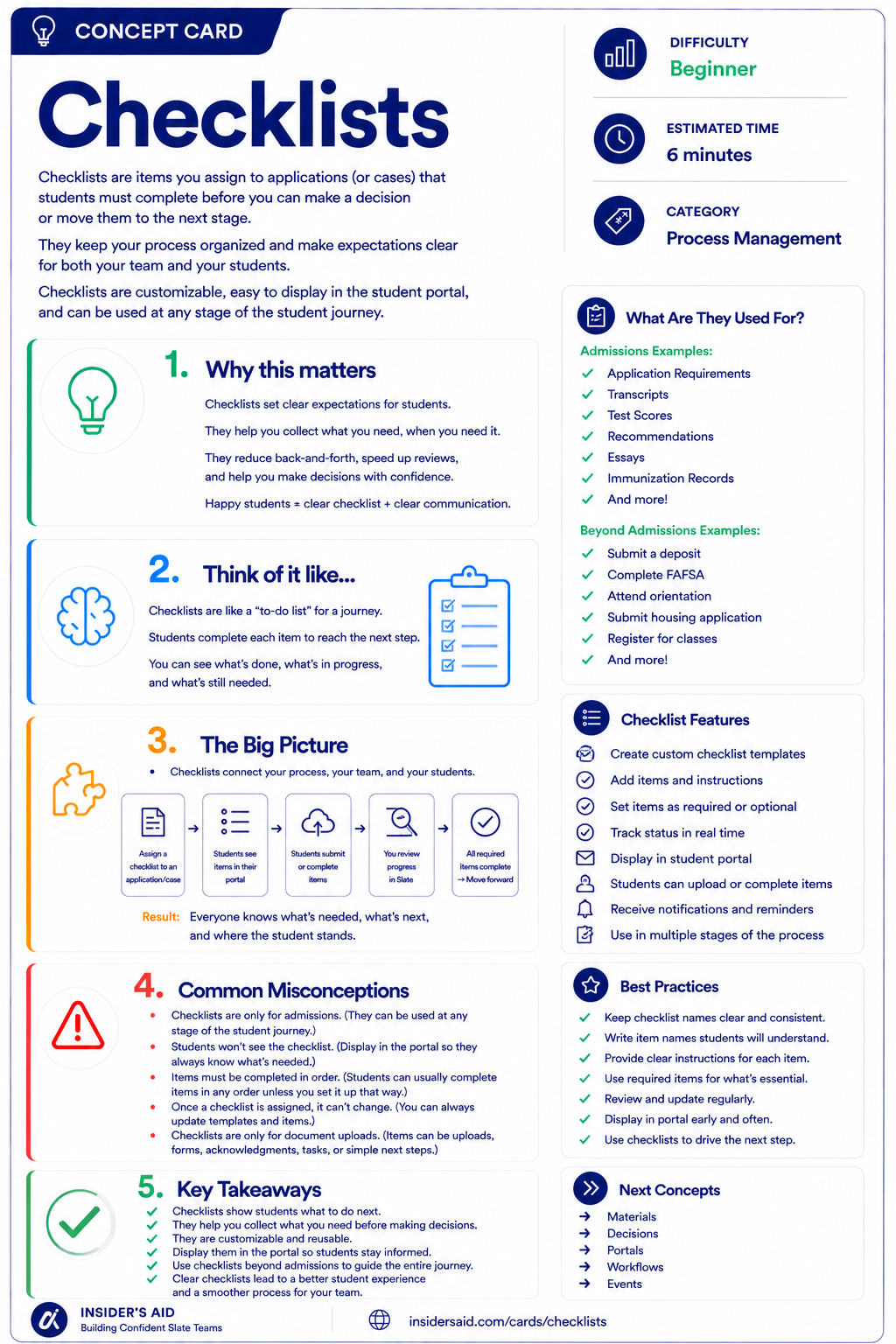
Checklists
Items students must complete before you can make a decision or move them forward.
Requirement → Status → Next Step
Official Transcript
Received / Complete — or Awaiting / Missing
Can the record move forward, or is something still needed?
Checklist item: Official Transcript
Status: Received / Awaiting
Process impact: can the record move forward?
Checklists turn requirements into visible process status.
They help staff and, when displayed to students, help students understand what remains outstanding.
Remember these
A collection of requirements or next steps associated with a record or process.
One individual requirement or task being tracked.
The current state of the requirement, such as complete or outstanding.
Something the student or institution expects to be satisfied before or during a process.
An action that may need to happen after the checklist status is reviewed.
Materials vs. Checklists
What was received?
- Official Transcript received September 12
What requirement are we tracking?
- Official Transcript — Complete
Materials represent received items. Checklists represent requirements and status. A received Material may satisfy a Checklist item, but the two concepts are not the same. For processors, it is important to verify both: What came in? And did the correct requirement update as expected?
Check your understanding
One question at a time. Wrong answers are just practice.
What is the main purpose of a Checklist in Slate?
Review a Student Checklist
Identify what is complete, what is outstanding, and what the checklist tells you about the student's process.
Open your institution's Slate database in another tab. Locate a student, application, or other record you are permitted to view that contains a checklist. Do not update or waive anything for this activity unless that is part of your normal authorized work. Review the checklist and identify what it tells you.
- At least one completed item
- At least one outstanding item, if available
- The type of requirement each item represents
- Whether any related Materials appear on the record
- Whether the checklist suggests the record is ready to move forward
- Any post-decision or next-step items if your institution uses them
Can you summarize the status? Use this template — and keep student-specific information in Slate, not here.
“This record has completed __________ but is still waiting on __________. Based on the checklist, the next step is __________.”
“This record has completed the transcript requirement but is still waiting on residency documentation. Based on the checklist, the record is not yet complete.”
Checklist names, statuses, visibility, completion logic, and student-facing display vary by institution. Focus on understanding what requirement is being tracked and whether it is complete or outstanding.
Slate is highly customizable. Your institution's tabs, fields, views, permissions, and processes may differ from examples used throughout Insider's Aid. Focus on understanding the concept rather than finding an identical screen.
Reflection
A checklist shows: Official Transcript — Complete; Residency Documentation — Awaiting. What is the best interpretation?
The Student Says They Submitted It
A student says: “I already sent my transcript, but my checklist still says it's missing.” What should you do first?
What should you do first?
Complete Doesn't Always Mean Finished
A student's pre-decision checklist is fully complete. Can you safely conclude that the student's entire journey is finished?
Can you safely conclude the student's entire journey is finished?
Checklist or Material?
Which statement describes a Checklist item?
Which statement describes a Checklist item?
Ready to Move Forward?
You're preparing a record for review. The checklist shows every required item as complete. What should you do next?
What should you do next?
Think Like a Slate Processor
What is required?
What has been received?
What is complete?
What is still outstanding?
Can the record move forward?
Don't look at a checklist as a row of boxes. Use it to understand the state of the process.
Ask: What requirement is this? What satisfies it? Has that happened? What does this status mean for the record?
Check the relationship, not just the status. If a requirement looks wrong, compare the checklist with the underlying Material or information before deciding what needs to happen.
Put It Together
The Processor pathway now builds: Find → Verify → Track.
Make sure you're working with the correct student and record.
Confirm what has been received and that it belongs where it should.
Understand what is complete, what is outstanding, and whether the record may be ready to move forward.
PERSON RECORD → MATERIAL: Official Transcript received → CHECKLIST: Official Transcript — Complete → CHECKLIST: Residency Documentation — Awaiting → PROCESSOR: knows what has been received and what is still needed.
Materials and Checklists work together to give processors a clearer picture of the record. One tells you what came in. The other tells you what the process still requires.
Process the record, not just the task. It can be tempting to think “Checklist says missing. Ask the student for it.” Instead ask: What requirement is missing? Was the item already received? Is the correct Material connected? Is the checklist reflecting the process accurately? What happens next if this requirement is completed? The goal is not simply to clear checklist items — it's to move the correct record through the correct process accurately.
The Requirements Are Complete. Now What?
Once the necessary information has been received and requirements are satisfied, the record may need to be reviewed in context.
That's where Reader comes in.
Keep Learning
Checklists
Items students must complete before you can make a decision or move them forward.
Materials
Review how submitted items can satisfy requirements.
Records
Review the student or process the checklist belongs to.
Reader
Learn how completed information may come together for structured review.
Decisions
Learn how an outcome can follow review.
Finished the lesson?
Mark it complete to track your progress. Progress is saved in this browser.
Reader
Use Reader to bring the information needed for structured review into one experience.