
Decisions
Explain the purpose of Decisions in Slate, recognize how a decision represents an outcome or stage in a process, locate decision information associated with a student, and use that information to better understand where the student is in their journey.
Decisions help organize and communicate outcomes so counselors can understand where a student is in a process and what may happen next.
Decisions: Understanding the Outcome
Counselors spend a lot of time helping students move through processes. A student may submit an application, complete requirements, wait for review, receive an outcome, move to another stage, receive an approval or denial, or be asked to complete a next step.
Slate Decisions help organize and communicate outcomes tied to those processes.
In admissions, a decision might represent Admitted, Denied, Waitlisted, Withdrawn, Canceled, or Deferred. In other student-facing processes, decisions may be used more broadly to represent another type of outcome or status.
For counselors, the important question is: What outcome has been recorded, and what does it mean for the student's next step?
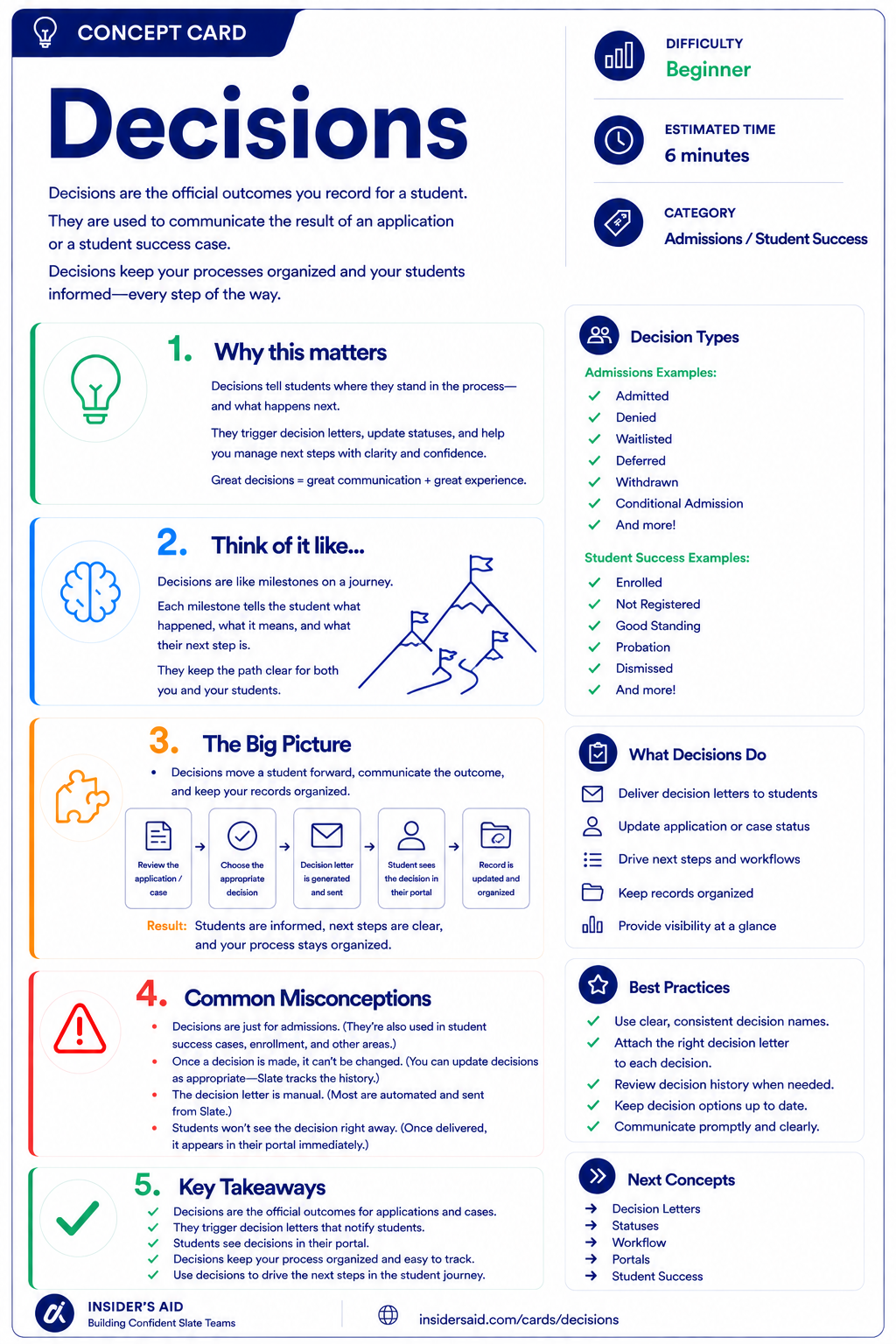
Decisions
The official outcomes you record for a student — and how Slate communicates them.
Process → Review → Decision → Next Step
The student moves through something structured
Relevant information is examined
An outcome is recorded
The student and institution know what happens next
Student moves through a process
Information is reviewed
An outcome is recorded
Student and staff know what happens next
A Decision is more than a label — it represents an outcome within a process.
A decision often helps determine how the student experience moves forward, including what they see, what they receive, and what they are asked to do next.
A decision tells you the outcome — but context still matters.
Remember these
A recorded outcome associated with a process or record.
The configured outcome used to represent what happened.
A communication that may be associated with a decision to notify the student of the outcome.
The result of a review or process.
What the student or institution may need to do after the outcome is recorded.
Decision Is Not the Whole Story
The same word can mean different things in different processes.
Recorded and released are not always the same moment.
Look for an associated letter or communication.
Requirements, checklist items, or next steps may still be open.
Some processes record more than one decision over time.
Use the decision as part of the student's broader Slate story.
Check your understanding
One question at a time. Wrong answers are just practice.
What is the primary role of a Decision in Slate?
Explore a Student Decision
Locate a decision and understand what it tells you about the student's current position in a process.
Open your institution's Slate database in another tab. Locate a student or record you are permitted to view that has a decision associated with it. Do not change or release any decision for this activity — simply explore the information available to you.
- Identify the decision or outcome
- Identify which process or record the decision belongs to
- Look for the date or timing of the decision if available
- Notice whether related communication or a decision letter is visible
- Look for any remaining requirements or next steps
- Ask what this decision means for the student's journey
Can you explain the decision in context? Use this template — and keep student-specific information in Slate, not here.
“This student received __________ as an outcome of __________. Their next step may be __________.”
“This student received an Admitted decision on their application. Their next step may be to review their decision letter and complete enrollment requirements.”
Decision names, release processes, letters, statuses, permissions, and next steps vary by institution. Focus on understanding what outcome was recorded and how it fits into the student's process.
Slate is highly customizable. Your institution's tabs, fields, views, permissions, and processes may differ from examples used throughout Insider's Aid. Focus on understanding the concept rather than finding an identical screen.
Reflection
A student has an “Admitted” decision but has not completed their enrollment deposit. What is the best interpretation?
A Student Asks, “What Does This Mean?”
A student contacts you and says: “I see that I've been admitted. What do I need to do now?” What should you do?
What should you do?
Outcome Is Not Enrollment
A student has an Admitted decision. What can you safely conclude?
What can you safely conclude?
Understand the Process Before Answering
A student says: “My portal says Waitlist. Does that mean I'm denied?” What is the best counselor approach?
What is the best counselor approach?
Decisions Beyond Admission
A student-success process uses a decision to indicate that a student has been approved to move into the next stage of a support program. What does this demonstrate?
What does this demonstrate?
Put the Counselor Pathway Together
A student contacts you and says: “I attended an event, submitted everything you asked for, and now my portal shows an outcome I don't understand. Can you help me figure out what happens next?” Which counselor workflow makes the most sense?
Choose the best order of work.
Think Like a Slate Counselor
What process is this?
What outcome was recorded?
What does that outcome mean?
What happens next?
When a student asks about their status, don't stop with: “What decision do I see?”
Ask: What process is this decision part of, and what does the student need to understand or do next?
Treat decisions as milestones, not endpoints. A decision tells you what happened in a process. Good counseling connects that outcome to the student's next step.
Put It Together
The complete Counselor pathway is now: Find → Understand → Collect → Engage → Communicate → Review → Outcome.
Start with the right student.
Understand the information stored about them.
Recognize how new information can be collected.
Understand how the student has interacted with your institution.
Continue conversations using context.
Bring relevant information together for structured review.
Understand the result of a process and what happens next.
A connected student journey: PERSON RECORD → FIELDS: Student information → FORM: Student provides information → EVENT: Student engages with the institution → INBOX: Student asks questions → READER: Information is reviewed in context → DECISION: Outcome is recorded → COUNSELOR: Helps the student understand the next step.
This is the counselor's Slate journey. You're not learning isolated modules — you're learning how Slate helps you understand and support a student from interaction to outcome.
Keep Learning
Decisions
The official outcomes you record for a student — and how Slate communicates them.
Reader
Review the information that may lead to an outcome.
Records
Return to the student's central record.
Inbox
Use communication context when explaining outcomes.
Forms
Review information students may have submitted during the process.
Finished the lesson?
Mark it complete to track your progress. Progress is saved in this browser.
Queries
Use Queries to identify groups of records that need review, follow-up, or processing.