
Materials
Explain what Materials represent in Slate, recognize how submitted documents and other items can be associated with records and processes, verify whether the correct Material has been received, and understand how Materials can support checklist completion and review.
Materials help Slate organize documents and other submitted items so processors can verify what has been received and how it connects to the student's process.
Materials: What Has Been Received?
Processing often starts with a simple question: Did we receive what we need?
Students and institutions may submit many kinds of information during a process — transcripts, test scores, recommendations, residency documents, verification forms, supporting documentation, institution-created materials, and other submitted items.
Slate uses Materials to help organize and associate these items with records and processes.
For processors, Materials provide an important way to verify what has been received and understand how that item fits into the student's record.
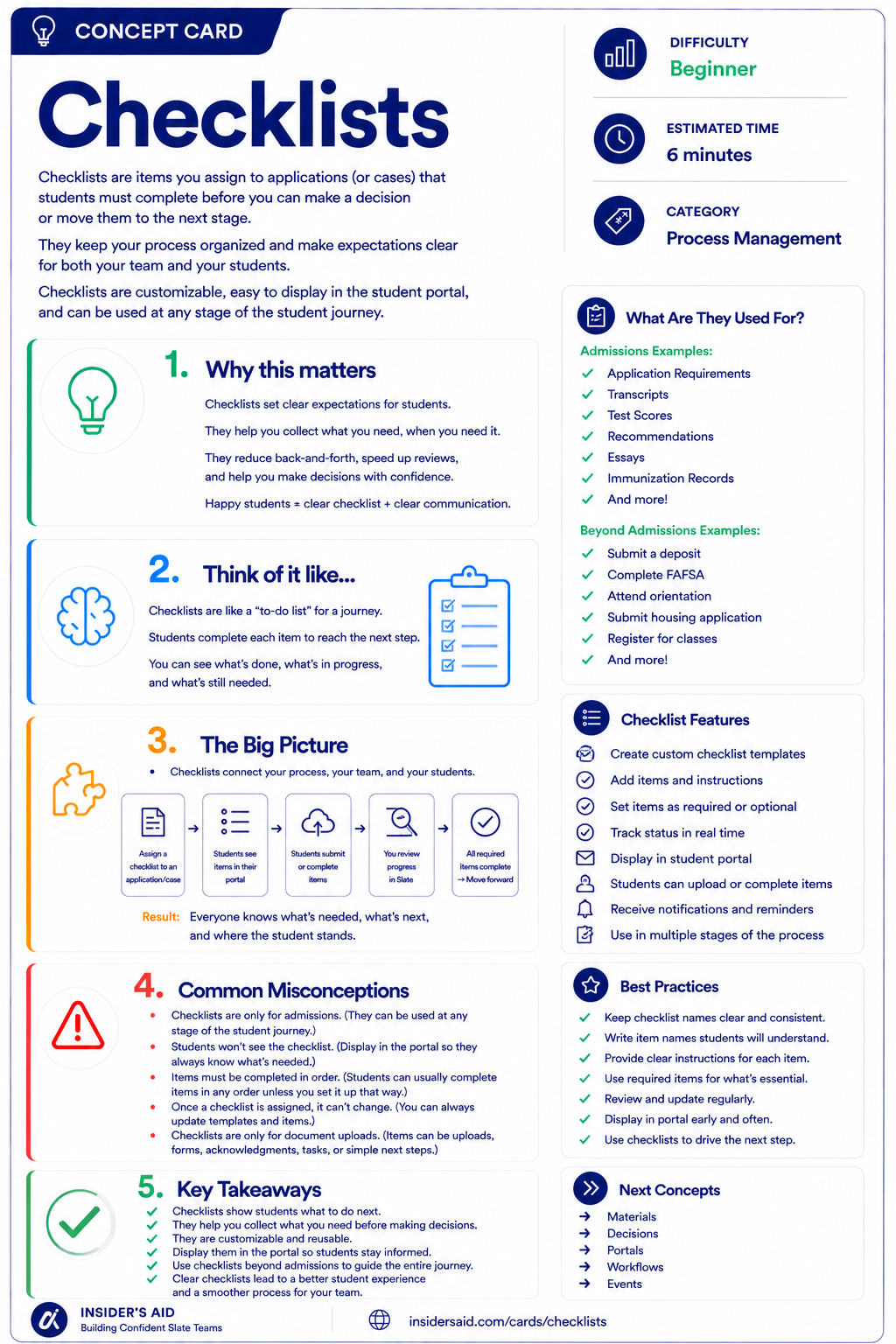
Checklists
Items students must complete before you can make a decision or move them forward.
Item Received → Material → Record / Process
A document or other item arrives
Slate represents that item as a Material
The Material is associated where it belongs
It can support review or requirement completion
Document or item arrives
Slate Material
Associated with the appropriate record
Can support review or requirement completion
A Material is not just a file sitting in Slate.
A Material represents an item that has been received and associated with a record or process so it can be reviewed and used.
Remember these
An item or document stored in Slate and associated with a record or process.
A Material type delivered or commonly used within Slate.
A Material type created by an institution for its own processes.
The instance of a Material associated with a student or other record.
The relationship between a received Material and a process requirement, such as a checklist item.
Material vs. Checklist
What was received?
- Transcript
- Recommendation
- Residency document
What is required or still outstanding?
- Official Transcript — Awaiting
- Recommendation — Received
- Residency Verification — Required
Materials represent what was received. Checklists help track what is needed. The two concepts are often connected, but they are not the same thing — a Material may satisfy or help complete a checklist requirement depending on how your institution has configured the process.
Check your understanding
One question at a time. Wrong answers are just practice.
Which statement best describes a Material in Slate?
Verify a Received Material
Locate a Material and confirm what was received and where it is associated.
Open your institution's Slate database in another tab. Locate a student or record you are permitted to view that has one or more Materials associated with it. Do not upload, edit, or move anything for this activity unless that is part of your normal authorized work. Explore one Material and identify what it tells you.
- What type of Material it is
- Which student or record it is associated with
- When it was received or added, if visible
- Whether the Material can be opened or reviewed
- Whether it appears connected to a requirement or process
- Whether the Material appears to belong on this record
Can you explain what you verified? Use this template — and keep student-specific information in Slate, not here.
“This record contains a __________ Material received on __________. It appears to support __________.”
“This record contains an Official Transcript Material received on September 12. It appears to support the transcript requirement on the application.”
Material names, categories, views, permissions, matching processes, and requirement connections vary by institution. Focus on understanding what was received, whose record it belongs to, and how it supports the process.
Slate is highly customizable. Your institution's tabs, fields, views, permissions, and processes may differ from examples used throughout Insider's Aid. Focus on understanding the concept rather than finding an identical screen.
Reflection
A record contains an Official Transcript Material. What does that tell you?
A Transcript Arrives
An official transcript arrives for a student. Before considering the processing task complete, what is the most important thing to verify?
What is the most important thing to verify?
Received Doesn't Always Mean Complete
A student says: “My transcript is showing in Slate, so why does my checklist still say it's missing?” What is the best processor mindset?
What is the best processor mindset?
Right Item, Wrong Record
You notice a transcript appears to have been associated with the wrong student. What is the safest conclusion?
What is the safest conclusion?
Material or Requirement?
Which statement describes a Material?
Which statement describes a Material?
Think Like a Slate Processor
What was received?
Who does it belong to?
Is it the correct Material type?
What process or requirement does it support?
Don't stop at: “I see a document.”
Ask: What is this item, whose record is it on, and what role does it play in the process? That habit helps protect the accuracy of everything that happens downstream.
Verify before you complete. A Material isn't useful simply because it exists in Slate. It needs to be the right item, on the right record, supporting the right process.
Put It Together
The Processor pathway now builds: Find → Verify.
Make sure you're working with the correct student and record.
Confirm what has been received and that it belongs where it should.
PERSON RECORD → APPLICATION / PROCESS → MATERIAL: Official Transcript → PROCESSOR VERIFIES: correct student, correct document, correct Material type, correct process.
Accurate processing starts with identity and verification. First make sure you have the right record. Then make sure the information attached to that record is correct.
Process the record, not just the task. It can be tempting to think “Transcript received. Done.” Instead ask: Whose transcript is this? Is it the correct Material? What requirement does it support? What happens next because this item is here? Processing accurately means understanding the effect of the task — not just completing it.
What Is Still Needed?
Knowing what has been received is only half of the processing question.
You also need to know what is still outstanding.
That's where Checklists come in.
Keep Learning
Checklists
Items students must complete before you can make a decision or move them forward.
Records
Review the record the Material belongs to.
Checklists
Learn how requirements and outstanding items can be tracked.
Reader
Learn how Materials may become part of structured review.
Finished the lesson?
Mark it complete to track your progress. Progress is saved in this browser.
Checklists
Understand how checklist items communicate and organize requirements throughout a process.