
Reader
Explain the purpose of Reader, recognize how Reader brings relevant information together for structured review, navigate a record in Reader, and use the information presented there to understand a student's situation before determining next steps.
Reader helps bring the information you need into one review experience so you can understand the student in context.
Reader: Bringing the Pieces Together
By this point, you've learned that a student's story in Slate can live across many different areas. Their Person record may contain identifying information. Fields hold individual pieces of data. Forms collect information. Events show engagement. Inbox gives you communication context.
Sometimes, though, you need to review several pieces of information together in a more structured way. That's where Reader comes in.
Reader provides a focused review experience that can bring records, materials, forms, notes, decisions, and other information together depending on how your institution has configured it.
For counselors, Reader can help answer a simple but important question: What do I need to understand about this student before I determine what happens next?
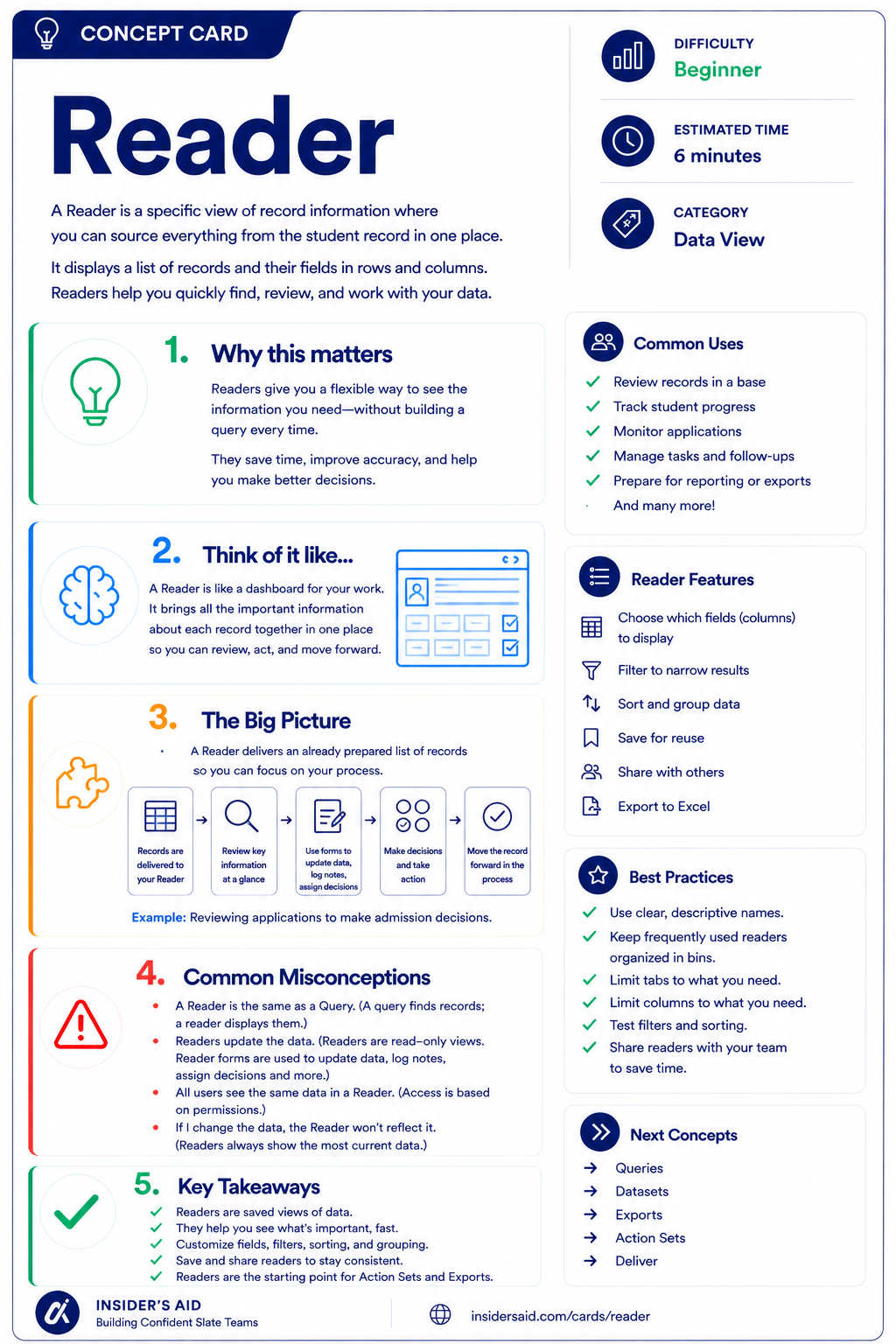
Reader
A saved view of record information — see, review, and act on what matters without building a query.
Reader = Information Brought Together for Review
Who you're reviewing
Documents and items submitted or collected
Information recorded through the process
Whatever the review process needs surfaced
Brings those pieces into one structured review experience
Student record
Materials
Forms / notes / data
Reader
Structured review
Reader helps reduce the need to hunt through multiple areas of Slate while reviewing a student.
What appears in Reader depends on how your institution has configured the review process.
Focus on the information being presented — not on memorizing where every item appears.
Remember these
A Slate review experience that brings relevant information together for structured review.
The process of examining information before determining a next step, action, or outcome.
A form used within Reader that may allow reviewers to record information, notes, ratings, recommendations, or other review data.
A way Reader records may be organized into groups or stages for review.
The combined information that helps you understand the student or case you're reviewing.
Reader Is a View Into the Process
It is a structured way to present information needed for a particular review process.
What you see may be different from what another counselor, reviewer, or institution sees because Reader can be customized around the review process.
Focus on the information being presented — not on memorizing where every item appears.
Check your understanding
One question at a time. Wrong answers are just practice.
What is the primary purpose of Reader?
Explore a Record in Reader
Navigate Reader and identify the information being brought together for review.
Open your institution's Slate database in another tab. Navigate to Reader and open a record you are permitted to review. Do not submit, update, or change anything for this activity unless that is part of your normal authorized work. Explore the review experience and identify what it contains.
- Who or what record is being reviewed
- What tabs, sections, or views are available
- Any documents or materials presented
- Any forms, notes, or information included in the review
- Any status, stage, or organizational information visible
- What question or decision the review process appears designed to support
Can you explain the purpose of this Reader experience? Use this template — and keep student-specific information in Slate, not here.
“This Reader experience brings together __________ so that the reviewer can __________.”
“This Reader experience brings together application information, materials, and review notes so that the reviewer can evaluate the student's application.”
Reader can be configured very differently depending on the institution and process. Tabs, forms, materials, bins, permissions, and available actions may vary. Focus on understanding what information has been brought together and why.
Slate is highly customizable. Your institution's tabs, fields, views, permissions, and processes may differ from examples used throughout Insider's Aid. Focus on understanding the concept rather than finding an identical screen.
Reflection
A Reader experience shows a student's application, transcript, counselor notes, and a review form. Why are these items presented together?
You Need the Full Picture
You're reviewing a student and need to understand their application information, submitted materials, and previous review notes before determining what should happen next. What Slate area would most naturally support this kind of structured review?
What Slate area would most naturally support this?
Don't Review in Isolation
You see one concerning piece of information while reviewing a student. What is the best next step?
What is the best next step?
What Is the Review Asking You to Do?
A Reader experience includes a review form asking for notes and a recommendation. What should that tell you?
What should that tell you?
Think Like a Slate Counselor
What am I reviewing?
What information is presented?
What context does it provide?
What am I expected to do next?
Reader becomes much easier to understand when you stop thinking: “What does every tab do?” and start asking: “What is this review process trying to help me understand or decide?”
Let the purpose of the review guide how you navigate the information.
Don't confuse seeing more information with understanding more information. Use Reader to connect the pieces, not just check each tab.
Put It Together
The Counselor pathway now builds: Find → Understand → Collect → Engage → Communicate → Review.
Start with the right student.
Understand the information stored about them.
Recognize how information can be collected.
Understand how the student has interacted with your institution.
Continue the conversation using context.
Bring the relevant information together to understand the student's situation.
An integrated example: PERSON RECORD → FORM: Student submits information → EVENT: Student participates in an activity → INBOX: Student asks a follow-up question → READER: Relevant information, materials, and notes are brought together → COUNSELOR: Reviews the student in context before determining the next step.
Each tool adds another layer of understanding. By the time you're in Reader, you're not looking at isolated data anymore — you're reviewing the student's story in context.
Keep Learning
Reader
A saved view of record information — see, review, and act on what matters without building a query.
Records
Review the student record that provides the foundation for the review.
Inbox
Review how communication can provide additional context.
Forms
Review how information may be collected.
Decisions
Learn how outcomes can be recorded and communicated.
Finished the lesson?
Mark it complete to track your progress. Progress is saved in this browser.
Decisions
Understand how Decisions represent outcomes and help organize where records are in a process.