
Deliver
Explain the role of Deliver in Slate, recognize the relationship between audience, message, sender, timing, personalization, and call to action, explore an existing communication, and evaluate whether a Deliver message is aligned to the intended audience and next step.
Deliver helps turn data and audience selection into communication. Effective use of Deliver depends on sending the right message to the right people with a clear purpose and next step.
Deliver: Turning Audience Into Action
By this point in the Communications pathway, you've already answered three important questions: Who are we communicating with? What do we know about them? Who actually needs this message?
Now it's time to send the communication. Slate Deliver supports email and other configured communication channels so institutions can communicate with individuals and groups of records.
But effective communication is more than choosing a recipient list and pressing Send.
A strong Deliver communication considers audience, purpose, message, sender, timing, personalization, call to action, and what happens after the student responds or takes action.
For Communications users, the most important question is: What does this audience need to know or do next?
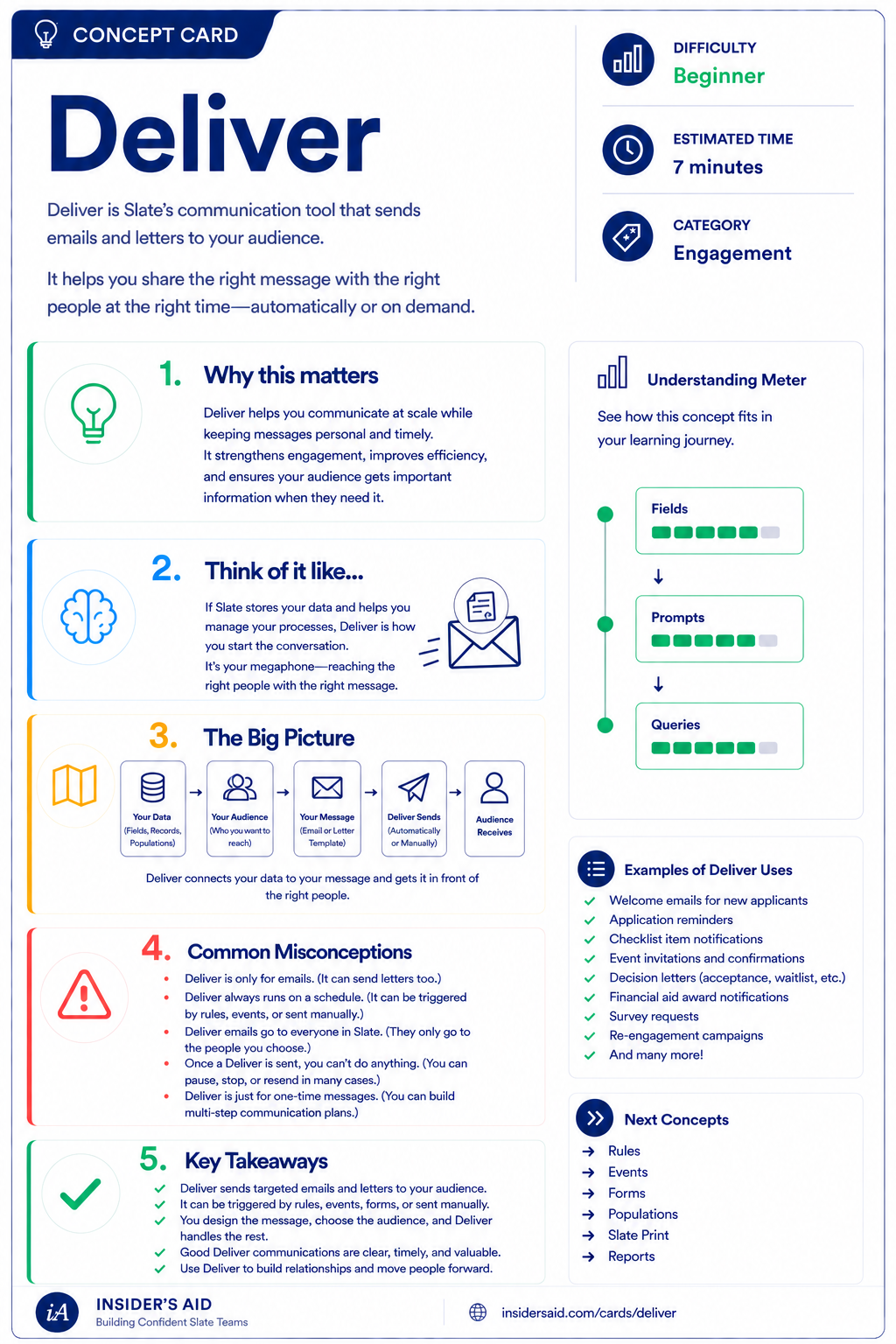
Deliver
Slate's communication tool that sends the right message to the right people at the right time.
Audience + Message + Next Step = Purposeful Communication
Who should receive it?
What should they receive?
What should they understand or do?
What happens next?
Query / Audience: who should receive it?
Deliver: what should they receive?
Call to Action: what should they understand or do?
Response / Action: what happens next?
Deliver sits in the middle of a larger communication process.
The audience comes from your data and targeting. The message should lead somewhere. A communication is successful when the right person receives the right information and understands the next step.
Remember these
Slate's communication area used to create and send messages to individuals or groups of records.
The people or records selected to receive the communication.
The person or identity the communication appears to come from.
Using available data to tailor communication to the recipient.
The action or next step the communication asks the recipient to take.
A preview or test version used to check content and functionality before sending to the intended audience.
Sending Is the Last Step, Not the First
Where people usually start
- “I need to send an email.”
Where you should start
- “Who needs to receive what information, and what should they do next?”
Deliver is most effective when audience selection and message purpose are already clear. Start with the student need and communication goal—not the send button.
Check your understanding
One question at a time. Wrong answers are just practice.
What is the primary role of Deliver?
Explore an Existing Deliver Communication
Identify the audience, purpose, message, and next step in a real communication.
Open your institution's Slate database in another tab. Locate an existing Deliver communication you are permitted to view. Do not send, edit, or activate anything unless that is part of your normal authorized work. Review the communication and identify what it is trying to accomplish.
- Who appears to be the intended audience
- What the purpose of the communication is
- Who the sender is
- Whether personalization is used
- What the recipient is being asked to understand or do
- Whether a Form, Event, portal, or other next step is linked
- Whether the message makes sense for the intended audience
Can you summarize the communication strategy? Use this template — keep institution-specific content in Slate, not here.
“This communication goes to __________ because __________. It tells them __________ and asks them to __________.”
“This communication goes to admitted students because registration for orientation has opened. It tells them when registration is available and asks them to register for an orientation event.”
Deliver configuration, communication channels, sender options, audience logic, templates, permissions, and scheduling vary by institution. Focus on understanding the relationship between audience, message, and next step.
Slate is highly customizable. Your institution's tabs, fields, views, permissions, and processes may differ from examples used throughout Insider's Aid. Focus on understanding the concept rather than finding an identical screen.
Reflection
A communication is sent to admitted students and asks them to register for Orientation. What is the call to action?
Who Needs This Message?
Orientation registration opens next week. Your team wants to email students who are eligible to register. What should happen before you build the Deliver message?
What should happen first?
Right Message, Wrong Audience
You create a perfect reminder for students who have not completed an enrollment form. Before sending, you realize the audience includes students who already submitted the form. What's the problem?
What's the problem?
What Should They Do Next?
You are drafting an email announcing that registration for a campus event is open. Which communication is stronger?
Which communication is stronger?
Personalization With Purpose
Your team wants to include a student's preferred campus in a communication. What should you verify first?
What should you verify first?
Test Before You Send
You're preparing a communication for several thousand students. It includes personalization and multiple links. What is the safest next step before sending to the full audience?
What is the safest next step?
Think Like a Slate Communications User
Who needs this?
What do they need to know?
What do we know about them?
What should they do next?
What happens after they act or respond?
Don't start with: “What email should we send?”
Start with: “What does this audience need from us right now?” Then use Slate's data and communication tools to support that need.
Write for the next step. A student should not have to reread a message three times to figure out why they received it or what they are supposed to do.
Right Person. Right Message. Right Next Step.
Before sending a communication, pause and verify:
Does the audience truly need this message?
Is the content relevant, accurate, and understandable?
Does the student know exactly what to do after reading it?
If one of those pieces is unclear, the communication probably isn't ready to send.
Put It Together
The Communications pathway now builds: Audience → Data → Target → Message.
Understand who the people behind the communication are.
Understand what information Slate knows about them.
Identify which records actually need the communication.
Send relevant information with a clear purpose and next step.
PERSON RECORDS → FIELDS: Program, Campus, Status, Email → QUERY: find students who meet the communication criteria → DELIVER: send the targeted communication → CALL TO ACTION: complete the intended next step.
Deliver doesn't stand alone. The quality of the message depends on the quality of the audience and the information behind it.
Good communication begins in the data long before the message is sent.
What Happens When They Reply?
Communication isn't always one-way.
- Students respond.
- They ask questions.
- They tell you something went wrong.
- They need clarification.
When those replies return to Slate, Inbox helps continue the conversation. That's where we're headed next.
Keep Learning
Deliver
Slate's communication tool that sends the right message to the right people at the right time.
Queries
Review how communication audiences can be identified.
Fields
Review the data that supports personalization and targeting.
Inbox
Learn what happens when recipients respond.
Forms
Learn how communications can lead students to provide information.
Events
Learn how communications can support student engagement.
Finished the lesson?
Mark it complete to track your progress. Progress is saved in this browser.
Inbox
Understand how student replies can return to Slate and continue the communication loop.