
Rules & Automation
Evaluate whether a process is appropriate for automation, identify triggers, criteria, actions, and dependencies, recognize common automation risks, review an existing Rule in context, and design a testing and monitoring approach before enabling automated behavior.
Automation should support a clear, stable process. Before building a Rule, understand what should trigger it, what must be true, what action should occur, and what else that action may affect.
Rules & Automation: What Should Slate Do Automatically?
Once data is in Slate and processes are defined, the next question often becomes: Can Slate do this automatically?
Sometimes the answer is yes. Rules can evaluate information and take action when defined conditions are met. That can save staff time, reduce repetitive work, and make processes more consistent.
But automation also increases the impact of mistakes. A manual error might affect one record. A poorly designed Rule can affect hundreds or thousands.
That changes the Admin responsibility. The question is not only “Can Slate automate this?” The better question is “Should this be automated, and under what exact conditions?”
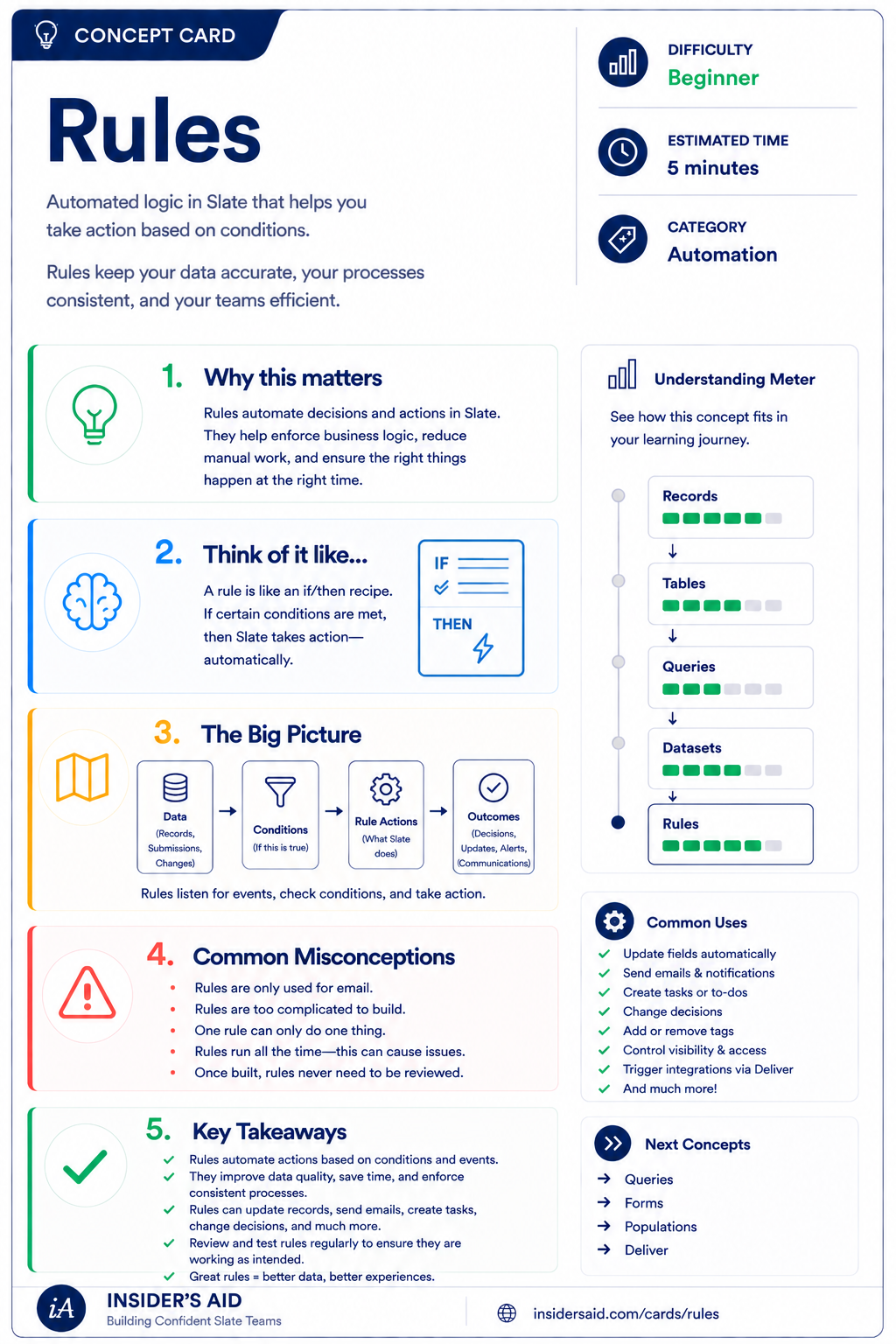
Rules
Automated if/then logic that takes action based on conditions you define.
Trigger → Criteria → Action → Impact
What causes Slate to check the Rule?
What must be true?
What should Slate do?
What else changes because the action happened?
Admin-level automation doesn't stop at the action. You also need to understand the consequences.
Core principle: Automate a Clear Process, Not a Confusing One. If staff cannot agree on when something should happen, who it should affect, or what the result should be, automation is premature.
Automation should make a well-understood process more consistent. It should not hide uncertainty.
Remember these
Logic that evaluates conditions and performs an action.
What causes Slate to check whether the Rule applies.
The conditions that determine whether the Rule should act.
What Slate does when the criteria are met.
Another process, field, workflow, portal, integration, communication, or action that relies on or is affected by the Rule.
A situation where the standard automation should not apply.
The practice of verifying that automated behavior continues to work as intended.
One Rule Can Touch More Than One Thing
A Rule may set or change a value other processes read.
Assigned or completed requirements shape what students see and do.
Automated data can influence outcome processes and release logic.
Messages may be triggered by, or filtered on, Rule-driven values.
Records may move—or stop moving—based on automated changes.
Conditional content can appear or disappear because of a Rule.
Exported values may be produced or altered by automation.
Counts and dashboards inherit whatever automation writes.
Automation creates dependencies. Before changing a Rule, ask what else relies on its action or output.
Can Be Automated vs. Should Be Automated
“Can Slate do this automatically?”
- Answered by configuration
- Focuses on available actions and triggers
- Success looks like “the Rule ran”
“Is this process stable, repeatable, and safe enough to automate?”
- Answered by process clarity and ownership
- Focuses on conditions, exceptions, and consequences
- Success looks like “the process improved”
Technical possibility is not the same as good process design. Before automating, ask: Does this happen consistently? Are the conditions objective? Is the desired action always appropriate? Are exceptions understood? Could the action be difficult to undo? How many records could be affected? What happens downstream?
Check your understanding
One question at a time. Wrong answers are just practice.
What is the strongest first question when someone asks for a new automated Rule?
Trace an Existing Rule
Explain what an existing Rule does, what it depends on, and what could be affected if it changed.
Open your institution's Slate environment in another tab. Locate a Rule you are permitted to review and that supports a process you understand. Do not change anything. Trace the Rule from trigger to impact.
- Identify what causes the Rule to be evaluated
- Identify the criteria
- Identify the action
- Identify what record or process is affected
- Identify any fields or values the Rule depends on
- Identify what happens downstream
- Identify any known exceptions
- Ask what would happen if the Rule acted incorrectly
Can you explain the Rule in plain language? Use this template — no institution-specific configuration details needed.
“When __________ causes evaluation, if __________ is true, Slate __________. This affects __________ and may also influence __________.”
Rule types, triggers, criteria, actions, evaluation behavior, dependencies, and permissions vary by institution. Focus on the logic and impact rather than finding an identical configuration.
Slate is highly customizable. Your institution's tabs, fields, views, permissions, and processes may differ from examples used throughout Insider's Aid. Focus on understanding the concept rather than finding an identical screen.
Reflection
A Rule updates a field used by multiple Queries, communications, and Portal conditions. What should the Admin conclude?
“Can Slate Do This Automatically?”
A department says: “Every time a student meets these conditions, can Slate automatically assign this next step?” What should the Admin do first?
What should the Admin do first?
Too Broad
A Rule should affect students in one specific program, but the criteria accidentally include all students at the campus. Why is this especially risky?
Why is this especially risky?
No Exception Path
A Rule automatically sends a communication when a checklist item is missing. Some students have approved exceptions and should not receive the message. What should the Admin consider?
What should the Admin consider?
Hard to Undo
A proposed Rule would automatically update a critical field that feeds the SIS. What should happen before enabling it?
What should happen before enabling it?
The Process Changed
A department changes its policy, but the old Rule is still active. What is the Admin risk?
What is the Admin risk?
Copying a Rule
You find a Rule in another area of Slate that looks similar to what you need. What is the best approach?
What is the best approach?
Should We Automate It?
Every week, staff manually assign the same checklist item when a student submits a specific form, Intent = Yes, and the program is one of three eligible programs. Students with an approved exception should not receive the checklist. Identify the trigger, criteria, action, exception, and downstream question.
Which breakdown is correct?
Think Like a Slate Admin
What process are we automating?
What starts the evaluation?
What must be true?
What action should occur?
Who or what could be affected?
What are the exceptions?
How will we test it?
How will we monitor it?
When someone asks “Can Slate do this automatically?” don't start with “Which Rule action do I need?” Start with “Should this process be automated?”
Understand the Impact Before You Make the Change. A Rule change may affect large groups of records, field values, checklist status, decisions, communications, portal visibility, workflow movement, integrations, reports, and staff workload. Before changing automation, understand both the intended action and the downstream consequences.
Watch for these automation traps: automating a broken process (the underlying process is unclear, inconsistent, or disputed); overly broad criteria (more records qualify than intended); no exception logic (special cases are ignored); hidden downstream dependencies (the Rule updates information used elsewhere but no one traces the impact); no test records (the Rule is enabled without representative testing); set it and forget it (automation remains active even after policy or process changes); automating everything (manual judgment is replaced even when human review is still appropriate).
The goal is not maximum automation. The goal is reliable automation where automation actually improves the process.
Automate a clear process, not a confusing one.
Put It Together
The Slate Admin pathway now builds: GOVERN → DESIGN → AUTOMATE → EXPERIENCE → CONNECT → CONTROL. Users & Permissions determines who can access and affect the system. Data Architecture determines where information belongs. Workflows determine how records move through processes. Portals determine what users see and do. Integrations & Data Movement determines how data moves between systems. Rules & Automation determines when Slate should act automatically and how to keep that automation reliable.
…from forms, staff, and integrations…
…fields, records, and datasets…
…workflows and steps…
…portals and staff tools…
…criteria are checked…
…and downstream processes respond.
The Admin is now controlling not just where data lives or how processes move, but when Slate takes action without human intervention.
Before You Automate
The Admin change framework, applied to automated behavior.
What process are we trying to automate?
Is the process clear and consistent?
What reliably causes evaluation?
What exactly must be true?
What should Slate do?
When should the action not happen?
What else depends on the result?
Do representative records behave correctly?
Did anything unintended happen?
How will we know the automation continues to behave correctly?
Why does this Rule exist and what does it affect?
Write the automation in plain language before opening the Rule editor: trigger, criteria, action, exceptions, dependencies, and how you'll verify the result.
Then test with representative records — including the ones that should not qualify.
What Happens When Something Doesn't Work?
Even carefully designed systems fail. A Rule may not evaluate. A Workflow may stop. An import may not update a record. A Portal may show the wrong content. A permission may block the user.
- The final Admin skill is not knowing every answer. It's knowing how to investigate.
- How do I know the system is working as intended?
- How do I trace the problem when it isn't?
That's where System Health & Troubleshooting comes in.
Keep Learning
Rules
Automated if/then logic that takes action based on conditions you define.
Workflows
Review process movement and step logic.
Data Architecture
Review the fields and structures automation depends on.
Integrations & Data Movement
Review how imported information may affect automation.
Portals
Review how Rule-driven data may affect user visibility.
System Health & Troubleshooting
Learn how to investigate automated behavior that doesn't work as expected.
Finished the lesson?
Mark it complete to track your progress. Progress is saved in this browser.
System Health & Troubleshooting
Learn a repeatable way to investigate problems, verify expected behavior, and maintain confidence in your Slate environment.