
Workflows
Explain the purpose of Workflows in Slate, translate a real-world process into a sequence of triggers, steps, conditions, and actions, distinguish workflow movement from scheduled processing, evaluate an existing workflow, and identify where a process may fail or require exception handling.
Workflows should reflect a clearly understood process. Map the process first, then use Slate to automate or support it.
Workflows: How Should This Process Move?
Many Slate Admin requests sound like this: “Can Slate move this automatically?” “Can we send this to the next person after review?” “Can this happen after the student submits the form?” “Can the record move to another stage when this condition is met?”
These are workflow questions. A Workflow helps organize a process as records move through defined steps.
But the most important part of building a Workflow happens before you open the Workflow configuration. You need to understand the real-world process.
Ask: What starts the process? What record is moving through it? What steps occur? What conditions determine where the record goes next? What actions happen at each stage? Who owns each step? What happens when something doesn't follow the normal path?
A Workflow should reflect a process you understand—not become the place where you try to figure the process out.
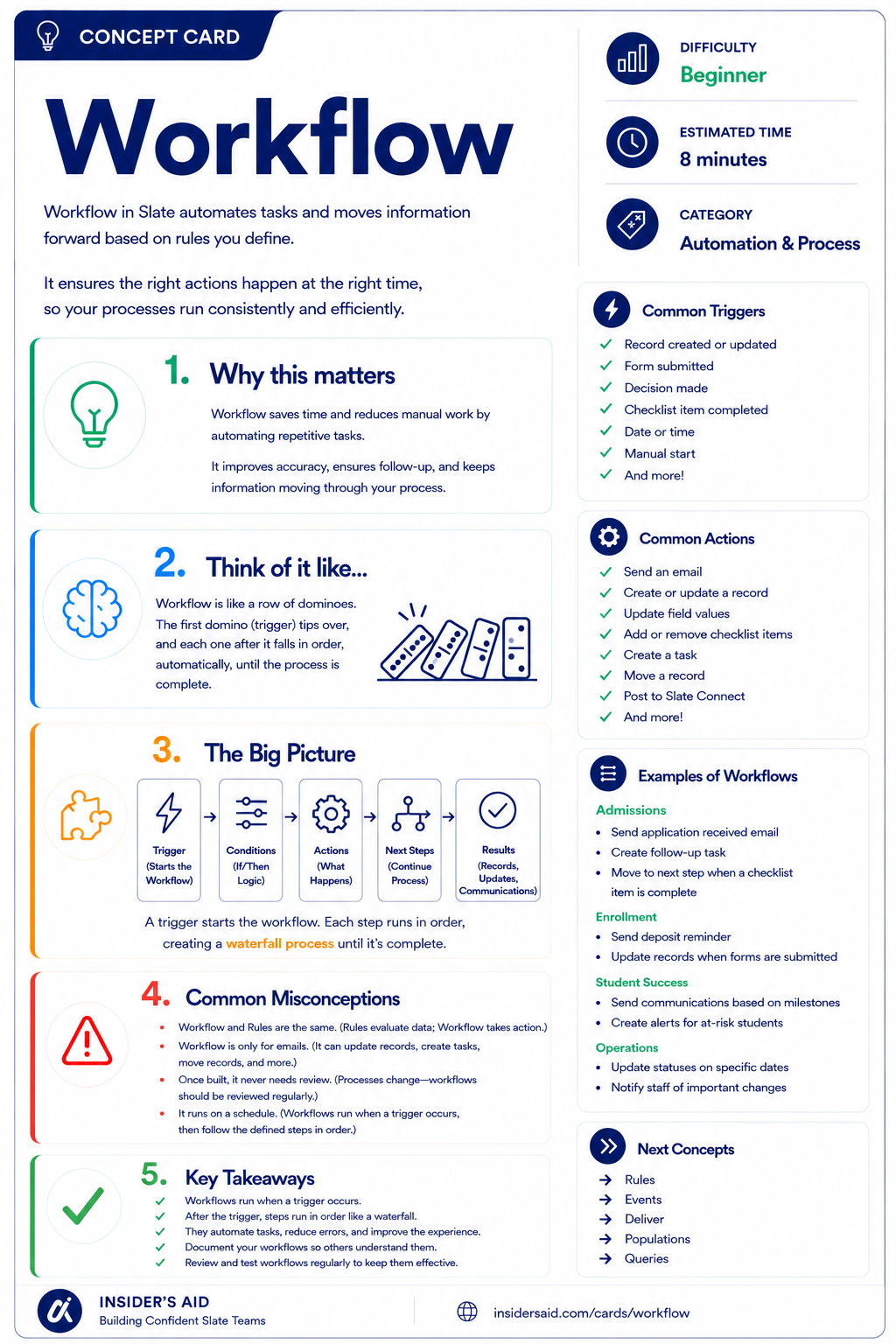
Workflow
Automates tasks and moves information forward based on the rules you define.
Trigger → Steps → Conditions → Actions → Outcome
TRIGGER — What starts the process?
STEP — Where is the record now?
CONDITION — What must be true to move or act?
ACTION — What happens at this point?
NEXT STEP / OUTCOME — Where does the record go?
Workflows turn a process into structured movement. The better you understand the process before building, the easier the Workflow is to design, test, and maintain.
Map the Process Before You Automate the Process. If you cannot explain the process in plain language, you are not ready to automate it. Before building, be able to describe: how the process starts, what happens first, what happens next, what conditions change the path, who is responsible, what successful completion looks like, and what exceptions may occur.
Remember these
A structured process that moves records through defined steps.
What causes the record to enter or advance within the process.
A stage or position within the Workflow.
Logic that determines whether an action should occur or where the record should move.
What Slate or a user does at a particular point in the process.
The intended result or end state of the Workflow.
A situation that does not follow the standard process path and may require special handling.
Write It in Plain Language First
“When a student submits the Intent to Enroll form, review their information. If they indicate Yes, move them to the enrollment preparation stage. If they indicate No, move them to the declined stage.”
Intent to Enroll form submitted.
Review response.
Intent = Yes?
Move to enrollment preparation.
Move to declined stage.
If you can draw the process before opening Slate, you're much more likely to build a Workflow that makes sense.
Workflow Is Not a Schedule
“The Workflow runs every night.”
- Treats the process as a job that fires at a set time
- Explains movement by the clock rather than by events
- Makes troubleshooting harder — “why didn't it run?”
“A Workflow is a trigger-based process.”
- Something causes a record to enter or move through the process
- Steps, conditions, and actions describe the movement
- Troubleshooting starts with: what should have triggered this?
Scheduled activity may exist elsewhere in a larger Slate process, but the Workflow itself should be understood as a sequence of movement driven by triggers, steps, conditions, and actions. Workflows move records through processes. They are not simply scheduled jobs.
Check your understanding
One question at a time. Wrong answers are just practice.
What should happen before building a Workflow?
Map an Existing Workflow
Translate an existing Workflow into plain-language process logic.
Open your institution's Slate environment in another tab. Locate a Workflow you are permitted to view and that supports a process you understand. Do not make changes. Trace the Workflow from beginning to end.
- Identify what causes a record to enter the Workflow
- Identify the record type moving through the process
- Identify the major steps
- Identify at least one condition or branch
- Identify actions that occur during the process
- Identify the intended outcome or completion state
- Look for places where a record could stop, fail, or require manual intervention
Can you explain the Workflow without using Slate configuration language? Use this template (no institution-specific configuration details needed here).
“When __________ happens, the record enters the process. It moves through __________. If __________ is true, then __________. The process is complete when __________.”
Workflow structures, triggers, steps, naming, permissions, and connected actions vary by institution. Focus on understanding the process represented by the Workflow rather than finding an identical configuration.
Slate is highly customizable. Your institution's tabs, fields, views, permissions, and processes may differ from examples used throughout Insider's Aid. Focus on understanding the concept rather than finding an identical screen.
Reflection
A Workflow contains a step called “Awaiting Documents.” What should the Admin understand beyond the step name?
“Can Slate Automate This?”
A department says: “When students submit this form, we want Slate to move them through several review stages automatically.” What is the best first response?
What is the best first response?
The Process Isn't Clear
Two departments disagree about what should happen after a record reaches the second stage of a process. What should the Admin do?
What should the Admin do?
What Starts the Workflow?
Your team wants a record to enter a process after a student submits a particular form. What architectural question matters most?
What architectural question matters most?
Happy Path vs. Real Process
A Workflow works perfectly when all required data is present, but records with missing information get stuck with no clear next step. What was likely overlooked?
What was likely overlooked?
Who Owns the Step?
A Workflow includes a manual review step, but no one knows which team is responsible for completing it. What is the Admin problem?
What is the Admin problem?
Think Like a Slate Admin
What starts the process?
What record is moving?
What are the major steps?
What conditions change the path?
What actions happen?
Who owns each step?
What does success look like?
What happens when the normal path fails?
When someone asks “Can Slate automate this?” don't start with “Which Workflow settings do I need?” Start with “Can you walk me through the process?”
Understand the Impact Before You Make the Change. A Workflow change may affect records already in the process, new records entering the process, users responsible for manual stages, rules or communications triggered by movement, checklist or decision logic, portal experiences, and integrations or downstream systems. Before changing the Workflow, understand which records and processes depend on it.
Watch for these Workflow traps: automating an unclear process (no one agrees what should happen, but the Admin builds it anyway); too many steps (the Workflow mirrors every tiny task rather than meaningful process stages); no exception path (the Workflow only supports records that behave perfectly); no owner (manual stages exist but no team is responsible for them); hidden dependencies (rules, communications, forms, or other processes depend on Workflow movement but are not considered during changes); using Workflow as a schedule (the process is designed as though the Workflow simply runs at a particular time rather than moving records based on triggers and conditions).
The best Workflow is not the one with the most automation. It's the one that clearly reflects the process and can be understood, tested, and maintained.
Map the process before you automate the process.
Put It Together
The Slate Admin pathway now builds: GOVERN → DESIGN → AUTOMATE. Users & Permissions determines who should be able to see and do what. Data Architecture determines where information should live and how it should relate. Workflows determine how records and information should move through a process.
work with…
…that moves through…
…where the Admin defines access, structure, movement, conditions, ownership, and outcome.
The Admin is no longer thinking about isolated configuration.
You're beginning to design how people, data, and processes work together.
Before You Build the Workflow
The Admin change framework, applied to process design.
What process are we trying to support?
What happens from beginning to end?
What reliably starts the process?
What are the steps, conditions, and actions?
Who is responsible for manual stages?
What happens when the normal path does not apply?
Can representative records move through every intended path?
Did the process behave as expected?
Why was the Workflow designed this way?
Before Slate: draw the process. Students submit an appeal form. A staff member reviews it. If documentation is missing, the student must provide additional information. If documentation is complete, the appeal goes to committee review. The committee either approves or denies the request. The student is then notified.
Trigger: appeal form submitted. Steps: Initial Review → Documentation Review → Committee Review → Outcome. Decision point: documentation complete? Exception: documentation missing. Owner: staff reviewer / committee. Outcome: approved or denied.
Once the process makes sense on paper, Slate becomes the tool used to support it.
What Does the User Experience Along the Way?
Processes may work perfectly behind the scenes and still create a confusing experience for the student or staff member using Slate.
- Where am I?
- What do I need to do?
- What information matters right now?
- What happens next?
That's where Portals come in.
The next Admin question is: What does this person need to see or do right now?
Keep Learning
Workflow
Automates tasks and moves information forward based on the rules you define.
Forms
Review one way a process may be triggered.
Rules
Review how conditions and actions can support automation.
Data Architecture
Review the data the Workflow depends on.
Portals
Learn how the user experiences information and next steps.
System Health & Troubleshooting
Learn how to trace where a process stopped behaving as expected.
Finished the lesson?
Mark it complete to track your progress. Progress is saved in this browser.
Portals
Learn how to design purposeful Slate experiences that show users the right information and actions at the right time.